
- PolyJet Legacy Printers
- Alaris30 V1
- Connex260
- Connex350/500
- Eden250
- Eden260
- Eden260V/VS
- Eden330
- Eden350
- Eden350V/500V
- J700 & J720 Dental
- J750/J735
- J750 Digital Anatomy
- Objet24/30 V2 Family
- Objet24/30 V3 Family
- Objet30 V5 Pro & Prime
- Objet260 Connex 1-2-3
- Objet260 Dental & Dental Selection
- Objet350/500 Connex 1-2-3
- Objet1000 Plus
- PolyJet Materials
- Agilus30 family
- Biocompatible
- Biocompatible Clear MED610
- Dental Materials
- Dental TrueDent Materials
- Dental TrueDent-D Materials
- Digital ABS Plus
- DraftGrey
- Elastico Clear/Black
- High Temperature
- MED610-DSG
- PolyJet Support
- Rigur & Durus
- Tango
- PolyJet ToughONE™
- Transparent
- Vero ContactClear
- Vero Family
- Veroflex
- VeroUltra Opaque
- Vivid Colors
- Stereolithography Materials
- Somos® 9120™
- Somos® BioClear™
- Somos® DMX SL™ 100
- Somos® Element™
- Somos® EvoLVe™ 128
- Somos® GP Plus™ 14122
- Somos® Momentum™
- Somos® NeXt™
- Somos® PerFORM™
- Somos® PerFORM Reflect™
- Somos® ProtoGen™ 18420
- Somos® ProtoTherm™ 12120
- Somos® Taurus™
- Somos® WaterClear® Ultra 10122
- Somos® WaterShed® AF
- Somos® WaterShed® Black
- Somos® WaterShed® XC 11122
- Somos® WaterShed® XC+
FAQ - Analyze SaaS
Quick Navigation:
- How do I get access to Analyze SaaS?
- Why is the ‘Configure Analyze’ option missing from the vertical navigation?
- Why is the “Get Started with Analyze SaaS” button inactive?
- How is my data secured in Analyze SaaS?
- How often is data updated in Analyze SaaS?
- Is data real-time in Analyze SaaS?
- Can I set up alerts or notifications in Analyze SaaS?
- My company owns a Stratasys printer, but I don’t see it in Analyze SaaS. Why?
- In printer 360 dashboard - I see Printer Status color as grey (Unavailable). What does “Unavailable” mean?
- I just added a printer to the Print Server. How long does it take for the printer data to appear on Analyze SaaS dashboards?
- I just commissioned a printer to an IoT Gateway. How long does it take for the printer data to appear on Analyze SaaS dashboards?
- Why don’t I see the Health Dashboard for FDM or J8 printers?
- Can I edit dashboards or create custom dashboards in Analyze SaaS?
- Additional Resources
These questions are specific to the cloud-based Analyze SaaS deployment.
1 How do I get access to Analyze SaaS?
To access Analyze SaaS, your company must meet the following prerequisites:
- Have an active Streamline Pro license
- Have either an IoT Gateway or a Print Server properly configured and connected to the internet Once these prerequisites are met, you can access Analyze SaaS through login.grabcad.com
2 Why is the ‘Configure Analyze’ option missing from the vertical navigation?
The ‘Configure Analyze’ option appears only if your company has an active Streamline Pro license.
If you have an active license and still don’t see this option, please contact streamline@grabcad.com
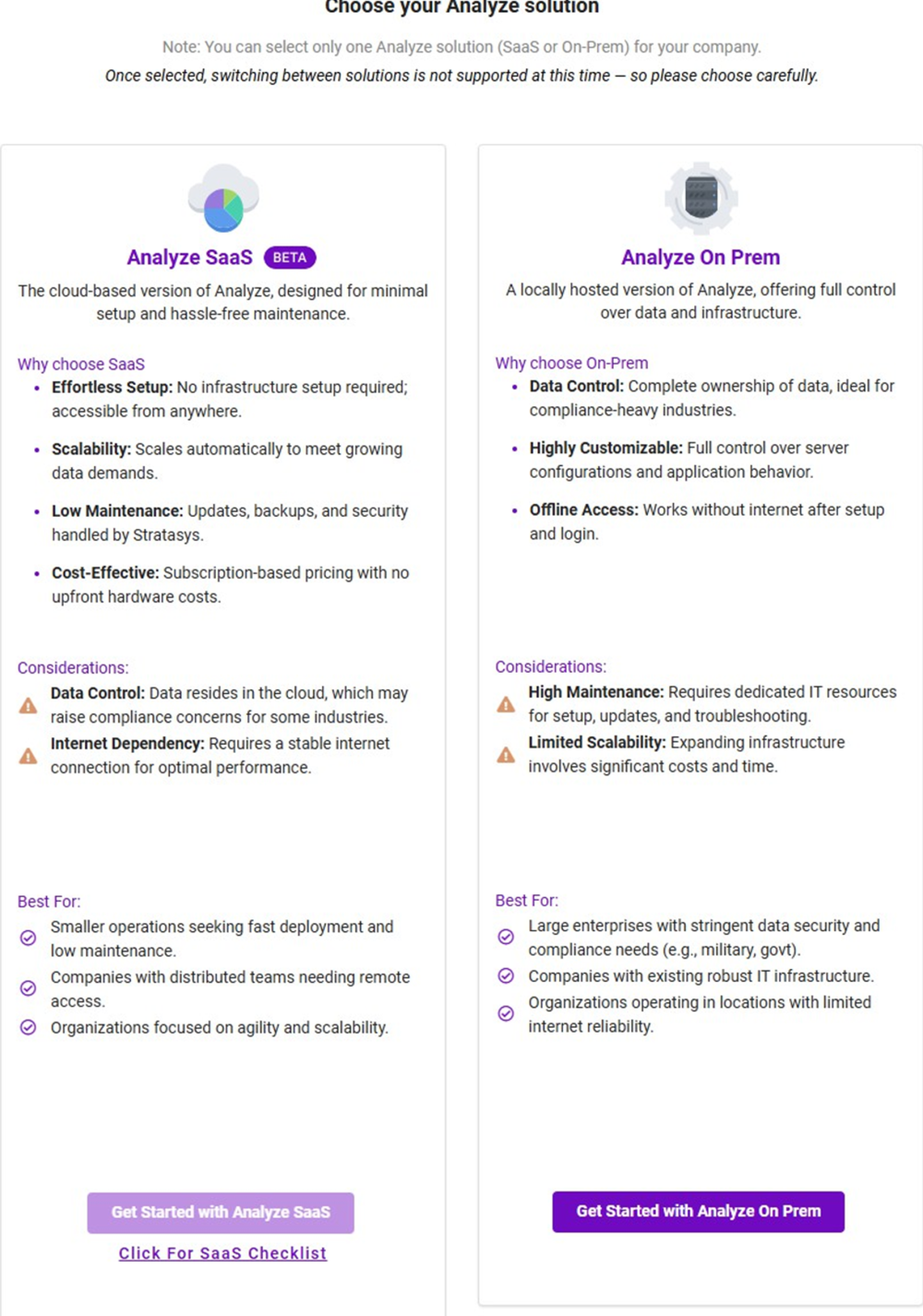
3 Why is the “Get Started with Analyze SaaS” button inactive?
This button appears inactive if your company has not completed one of the required prerequisites:
- Setup an IoT Gateway and connect to a printer
- Install the Print Server and connect to a printer
You can find setup instructions here:
4 How is my data secured in Analyze SaaS?
Analyze SaaS adheres to enterprise-grade security standards:
- Data is encrypted both at rest and in transit
- Each company (tenant) has isolated data storage
- Access is managed via role-based controls: Admin-Editor, Viewer
What data is collected:
Analyze collects printer activity data, including print status, idle status, material consumption, and basic job information. We do not collect any sensitive data like print files or proprietary design information. Customers can control what operational data is shared through privacy settings.
5 How often is data updated in Analyze SaaS?
Data refresh frequency depends on your printer connection:
- For printers connected via IoT Gateway: Data is collected continuously and refreshed in Analyze SaaS near-real-time, typically within 5 to 10 minutes after printer events.
- For printers connected via Print Server: Data is collected every 10 minutes and refreshed in Analyze SaaS on the same interval.
6 Is data real-time in Analyze SaaS?
No. While data is updated frequently, it is considered near-real-time with an expected delay of approximately 5 to 10 minutes.
7 Can I set up alerts or notifications in Analyze SaaS?
Currently, only basic job status change alerts are available. These alerts notify you when print jobs start, complete, fail, or experience errors.
More advanced, user-friendly in-app alerts and customizable notification options will be introduced in future updates.
8 My company owns a Stratasys printer, but I don’t see it in Analyze SaaS. Why?
To appear in Analyze SaaS, the following conditions must be met:
- For PolyJet J3/J5 printers:
- Must be connected to an IoT Gateway or a Print Server
- For all other printers (FDM and PolyJet):
- Must be connected to a Print Server
- Additional requirement:
- The printer must have an active Streamline Pro license
Please confirm these conditions are met. If they are and you still don’t see your printer, contact streamline@grabcad.com
9 In printer 360 dashboard - I see Printer Status color as grey (Unavailable). What does “Unavailable” mean?
The status “Unavailable” indicates that either:
- The printer is turned off or not communicating with the IoT Gateway/Print Server, OR
- The IoT Gateway or Print Server itself is offline or experiencing connectivity issues
Troubleshooting steps:
- Verify the printer is powered on and connected to the network
- Check that the IoT Gateway or Print Server is online and has internet connectivity
- Confirm the printer is properly configured in the Print Server or IoT Gateway
10 I just added a printer to the Print Server. How long does it take for the printer data to appear on Analyze SaaS dashboards?
After successfully connecting your printer to a Print Server, it may take approximately 30 minutes for the printer data to appear on Analyze SaaS dashboards.
If data does not appear after 30 minutes, verify:
- The printer has an active Streamline Pro license
- The Print Server has internet connectivity
- The printer is properly connected to the Print Server
11 I just commissioned a printer to an IoT Gateway. How long does it take for the printer data to appear on Analyze SaaS dashboards?
After successfully commissioning a printer with an IoT Gateway, it may take approximately 30 minutes for the printer data to appear on Analyze SaaS dashboards.
If data does not appear after 30 minutes, verify:
- The printer has an active Streamline Pro license
- The IoT Gateway has internet connectivity
- The printer is properly commissioned in the IoT Gateway
12 Why don’t I see the Health Dashboard for FDM or J8 printers?
Health dashboards are currently available only for printers connected via the IoT Gateway.
Printers connected through a Print Server (such as FDM or J8 series) do not support health monitoring at this time.
13 Can I edit dashboards or create custom dashboards in Analyze SaaS?
Currently, only a fixed set of non-editable dashboards have been provisioned for Analyze SaaS. The ability to create or edit custom dashboards may be included in future releases. For full dashboard customization capabilities, consider using Analyze On-Prem.
Additional Resources
How do I contact Stratasys support?
For Analyze SaaS users:
After logging into Analyze SaaS, click the ‘Contact Us’ button located at the top left corner of the interface.
Alternatively, you can email us at streamline@grabcad.com
For all users:
Visit the GrabCAD Help Center at support.stratasys.com or email streamline@grabcad.com
GrabCAD Help Center: support.stratasys.com
Installation Guides:
- Setting Up GrabCAD Analyze – Installation
- Setting Up GrabCAD Analyze (Continued) – Configuration
Support Contact:
Email: streamline@grabcad.com
Product Information:
- GrabCAD Streamline Pro overview
- GrabCAD Print Server documentation
- IoT Gateway setup guide