
- PolyJet Legacy Printers
- Alaris30 V1
- Connex260
- Connex350/500
- Eden250
- Eden260
- Eden260V/VS
- Eden330
- Eden350
- Eden350V/500V
- J700 & J720 Dental
- J750/J735
- J750 Digital Anatomy
- Objet24/30 V2 Family
- Objet24/30 V3 Family
- Objet30 V5 Pro & Prime
- Objet260 Connex 1-2-3
- Objet260 Dental & Dental Selection
- Objet350/500 Connex 1-2-3
- Objet1000 Plus
- PolyJet Materials
- Agilus30 family
- Biocompatible
- Biocompatible Clear MED610
- Dental Materials
- Dental TrueDent Materials
- Dental TrueDent-D Materials
- Digital ABS Plus
- DraftGrey
- Elastico Clear/Black
- High Temperature
- MED610-DSG
- PolyJet Support
- Rigur & Durus
- Tango
- PolyJet ToughONE™
- Transparent
- Vero ContactClear
- Vero Family
- Veroflex
- VeroUltra Opaque
- Vivid Colors
- Stereolithography Materials
- Somos® 9120™
- Somos® BioClear™
- Somos® DMX SL™ 100
- Somos® Element™
- Somos® EvoLVe™ 128
- Somos® GP Plus™ 14122
- Somos® Momentum™
- Somos® NeXt™
- Somos® PerFORM™
- Somos® PerFORM Reflect™
- Somos® ProtoGen™ 18420
- Somos® ProtoTherm™ 12120
- Somos® Taurus™
- Somos® WaterClear® Ultra 10122
- Somos® WaterShed® AF
- Somos® WaterShed® Black
- Somos® WaterShed® XC 11122
- Somos® WaterShed® XC+
FAQ - General Questions
Quick Navigation:
- What is GrabCAD Analyze?
- Do I already have access to GrabCAD Analyze?
- Which printers does Analyze support?
- How many users can access Analyze?
- Do I need a separate license for Analyze?
- What dashboards are included?
- Can I customize the dashboards?
- Can I switch between Analyze SaaS and On-Prem?
- Additional Resources
These questions apply to both Analyze SaaS and Analyze On-Prem deployments.
1What is GrabCAD Analyze?
GrabCAD Analyze is a comprehensive analytics platform that provides near-real-time and historical insights into printer performance, utilization, and job history for Stratasys 3D printers. It is included with GrabCAD Streamline Pro and is available in two deployment options:
- Analyze SaaS: Cloud-based analytics accessible from anywhere via web browser
- Analyze On-Prem: Installed on-prem behind your firewall for complete data control
Note: Analyze currently supports only Stratasys Printers.
2 Do I already have access to GrabCAD Analyze?
If you have an active GrabCAD Streamline Pro license, yes! GrabCAD Analyze is included at no additional cost. To get started, go to login.grabcad.com and configure Analyze.
3 Which printers does Analyze support?
GrabCAD Analyze works with all Stratasys FDM and PolyJet printers currently supported by GrabCAD Print.
Specific printer connectivity requirements:
For Analyze SaaS:
- PolyJet J3 and J5 printers: Must be connected via IoT Gateway or GrabCAD Print Server
- PolyJet J8 printer: Must be connected via GrabCAD Print Server
- All FDM printers: Must be connected via GrabCAD Print Server
- SAF printers: Must be connected via IoT Gateway or GrabCAD Print Server
For Analyze On-Prem:
- All Stratasys FDM and PolyJet printers supported by GrabCAD Print.
- SAF coming soon.
4 How many users can access Analyze?
Since GrabCAD Streamline Pro is a per-printer license, there is no limit to the number of users who can access GrabCAD Analyze and its dashboards.
All authorized users within your organization can access Analyze features.
5 Do I need a separate license for Analyze?
No. GrabCAD Analyze is included with your GrabCAD Streamline Pro license at no additional cost.
Pricing for new customers:
- $2,000 per Stratasys printer, annual subscription
- FDM and PolyJet printers currently supported
6 What dashboards are included?
GrabCAD Analyze includes multiple out-of-the-box dashboards:
Fleet Management:
- Additive Manufacturing Lab Manager Dashboard: Displays utilization, uptime, and downtime across your entire fleet
- Performance Dashboard: Reviews performance scores calculated by comparing estimated and actual times
Individual Printer Insights:
- Printer 360 Dashboard: Technology-specific dashboards (FDM Printer 360, PolyJet Printer 360) provide in-depth machine activity, availability breakdown, current job details, and material status
- Self-Service Dashboard Creation: Advanced users with technical skills can create custom dashboards using the collected printer data (Analyze On-Prem only)
Historical Data:
- Material Usage Dashboard: Displays material usage history
- Job History Dashboard: Lists completed print jobs with status and durations
- Printer History Dashboard: Shows history of print jobs, materials used, and parts printed
Maintenance & Health (IoT printers only):
- Printer Health Dashboard: Helps operators stay on top of mandatory maintenance/wizards and provides material expiry information
More dashboards and capabilities will be added in upcoming releases.
AM Lab Manager Dashboard showing utilization metrics
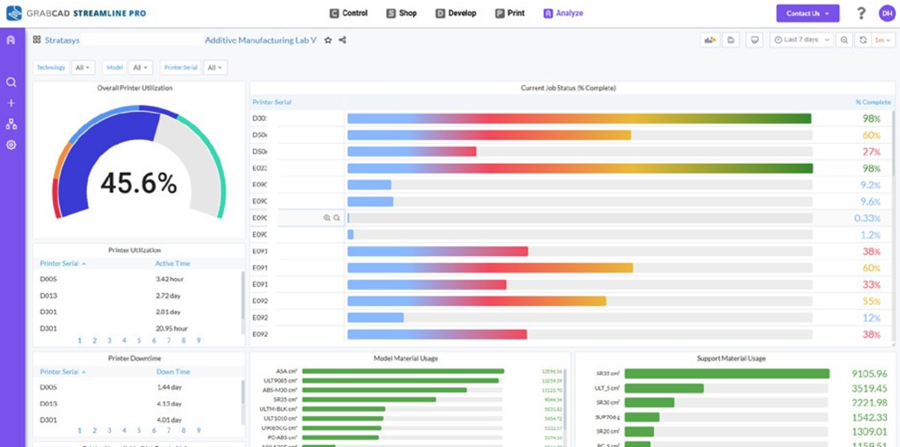
Additional dashboard views with utilization data
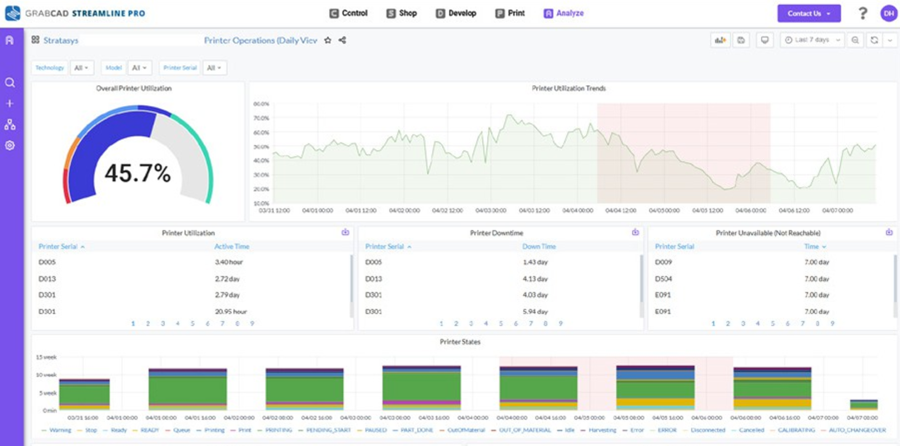
Machine 360 Dashboard with detailed printer info
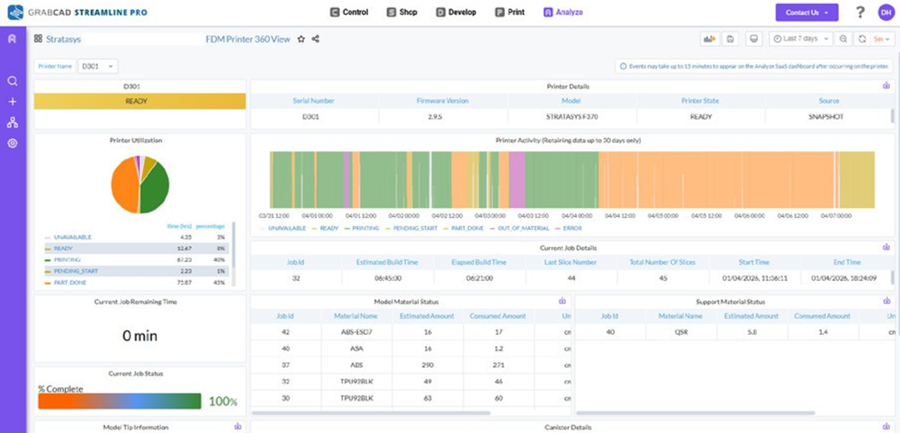
Printer Health Dashboard with maintenance schedules
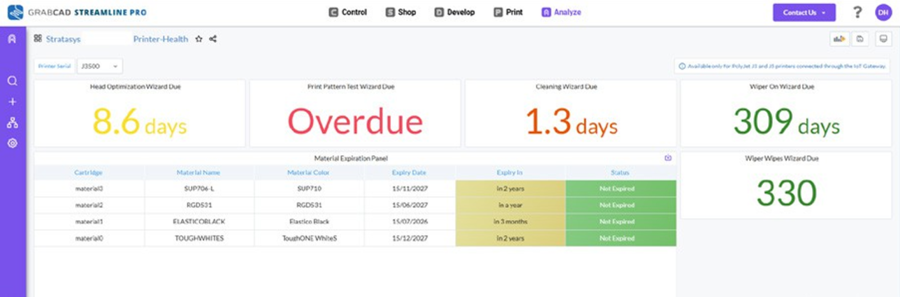

7 Can I customize the dashboards?
Analyze On-Prem: Yes. Create custom dashboards filtered by printer, time period, material type, or other parameters. Use the data collected from printers to build dashboards for the metrics that matter most to your team.
Analyze SaaS: Currently, only a fixed set of non-editable dashboards have been provisioned. The ability to create or edit custom dashboards may be included in future releases.
8 Can I switch between Analyze SaaS and On-Prem?
Switching between Analyze SaaS and On-Prem cannot be done using the application. Please choose the appropriate option based on your operational needs.
If a change is still needed, please contact us at streamline@grabcad.com
Additional Resources
How do I contact Stratasys support?
For Analyze SaaS users:
After logging into Analyze SaaS, click the ‘Contact Us’ button located at the top left corner of the interface.
Alternatively, you can email us at streamline@grabcad.com
For all users:
Visit the GrabCAD Help Center at support.stratasys.com or email streamline@grabcad.com
GrabCAD Help Center: support.stratasys.com
Installation Guides:
- Setting Up GrabCAD Analyze – Installation
- Setting Up GrabCAD Analyze (Continued) – Configuration
Support Contact:
Email: streamline@grabcad.com
Product Information:
- GrabCAD Streamline Pro overview
- GrabCAD Print Server documentation
- IoT Gateway setup guide