
Printers
- PolyJet Legacy Printers
- Alaris30 V1
- Connex260
- Connex350/500
- Eden250
- Eden260
- Eden260V/VS
- Eden330
- Eden350
- Eden350V/500V
- J700 & J720 Dental
- J750/J735
- J750 Digital Anatomy
- Objet24/30 V2 Family
- Objet24/30 V3 Family
- Objet30 V5 Pro & Prime
- Objet260 Connex 1-2-3
- Objet260 Dental & Dental Selection
- Objet350/500 Connex 1-2-3
- Objet1000 Plus
Materials
- PolyJet Materials
- Agilus30 family
- Biocompatible
- Biocompatible Clear MED610
- Dental Materials
- Dental TrueDent Materials
- Dental TrueDent-D Materials
- Digital ABS Plus
- DraftGrey
- Elastico Clear/Black
- High Temperature
- MED610-DSG
- PolyJet Support
- Rigur & Durus
- Tango
- PolyJet ToughONE™
- Transparent
- Vero ContactClear
- Vero Family
- Veroflex
- VeroUltra Opaque
- Vivid Colors
- Stereolithography Materials
- Somos® 9120™
- Somos® BioClear™
- Somos® DMX SL™ 100
- Somos® Element™
- Somos® EvoLVe™ 128
- Somos® GP Plus™ 14122
- Somos® Momentum™
- Somos® NeXt™
- Somos® PerFORM™
- Somos® PerFORM Reflect™
- Somos® ProtoGen™ 18420
- Somos® ProtoTherm™ 12120
- Somos® Taurus™
- Somos® WaterClear® Ultra 10122
- Somos® WaterShed® AF
- Somos® WaterShed® Black
- Somos® WaterShed® XC 11122
- Somos® WaterShed® XC+
Analyze SaaS - Quick Start Guide
Introduction to Analyze SaaS
Analyze SaaS is Stratasys’ cloud-based analytics platform designed to help customers gain near real-time insights into printer performance, utilization, job and material information.
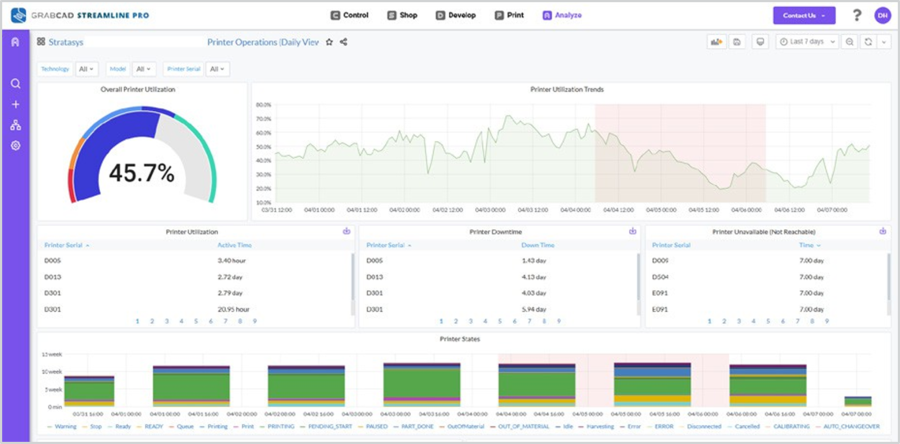
With Analyze SaaS, users can view dashboards that visualize key printer metrics such as job information, material usage, uptime, and printer health.
Getting Started
You can access Analyze SaaS through the GrabCAD Control (Admin Console). To begin:
- Log in to GrabCAD Control using your existing credentials – https://login.grabcad.com/
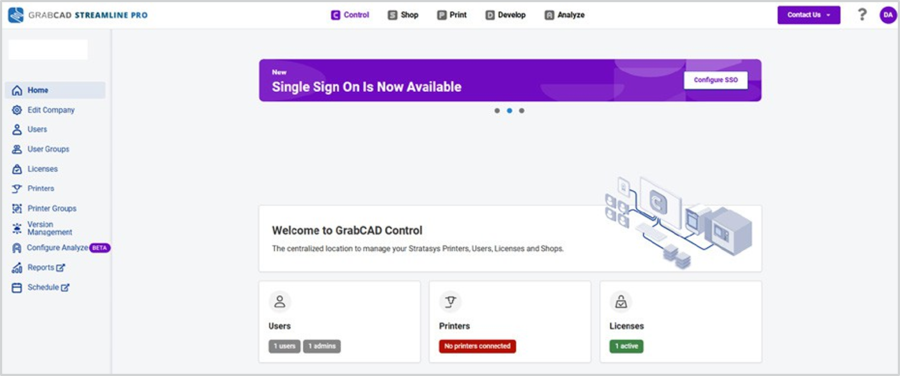
- Click on ‘Configure Analyze’ to activate Analyze SaaS for your organization.
- Once enabled, you can view analytics dashboards directly in your browser for your connected Stratasys printers.
Pre-Requisites:
- Ensure that your company has an active Streamline Pro license.
- Ensure that your company’s IoT Gateway or Print Server is running 24×7 to provide continuous and reliable printer data to Analyze.
You can find setup instructions for IoT Gateway and GrabCAD Print Server here:
Key Features of Analyze SaaS
Analyze SaaS includes the following capabilities:
- Access dashboards for PolyJet and FDM printers.
- Printer 360 view which includes jobs and material information.
- Printer utilization, uptime and downtime.
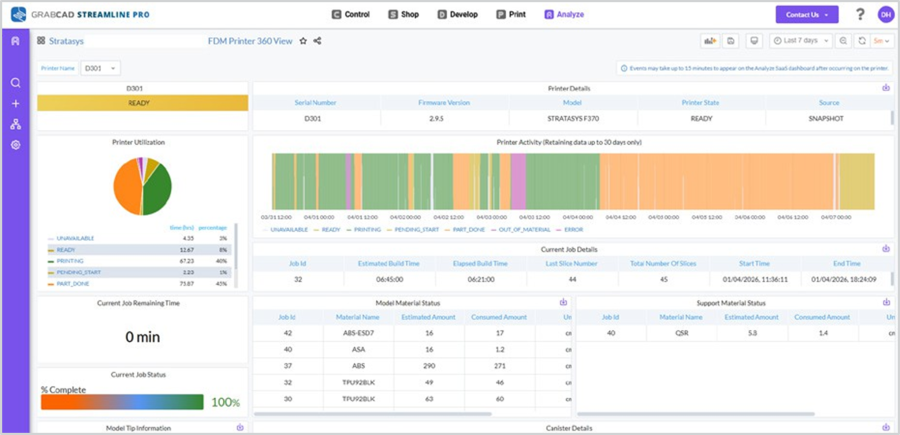
- Near Real-time and historical data visualization for printer performance.
- Printer Health dashboards (for PolyJet J3 and J5 only) – showing upcoming maintenance.
- Job History dashboards for monitoring print activity and utilization.
- Secure, role-based access through your company credentials.
Features Not Included in Analyze SaaS
- Printer history – Print Jobs and Material history from the past.
- Alerts and Notifications configuration.
(Currently we support only one alert -> job status change. More alerts planned for a future release). - Migration of on premises Analyze data to SaaS environment.
- Origin, Neo series printers and non-Stratasys printers are not supported at the moment.