
Tray Validation
Before sending a job to the printer for production, you should check that the tray is “valid” and can be printed.
Note: Because of the unique characteristics of each type of modeling material, make sure that the correct material is selected before performing Tray Validation.
To validate that the tray can be printed:
| ➢ | On the Tray Settings ribbon, in the Build Process group, click  . . |
or—
From the Tools menu, select .
If the tray is not valid, the color of the problematic models on the tray changes according to a pre-set code.
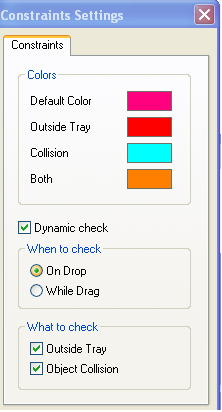
Note: The “Both” color also indicates a problematic stl file.
The validation status appears on the bar at the bottom of the screen.

If the maximum combined weight of models on the build tray exceeds 135 kg, a warning message appears. If so, you can remove or resize one or more models before sending the tray to the printer.
 Related Topics
| Questions, comments, suggestions? c-support@stratasys.com | Legal | © Stratasys |